PlayStation 3 + ProxySwitcher
Disclaimer of responsibility - actions described in this article open up external, potentially unauthorized, access to internal proxy server
of the ProxySwitcher. Proceed at your own risk.
Due to multiple requests of how to get PS3 to use Proxy Switcher, I have written here a short guide. Main issue is that PS3 does not know how to authenticate with password protected proxy servers. Which means that this guide applies to programs and devices with similar issues.
Configuring Proxy Switcher
First of all it's required that Proxy Switcher's internal proxy server does not require authentication. By default, it's configured to accept connections only from localhost and not require authentication.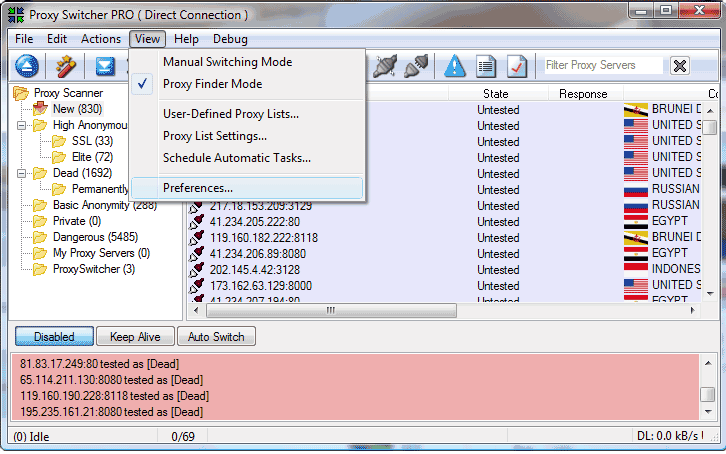 So first of all need to go into Proxy Switcher's preferences (View ⇒ Preferences from main menu).
Then go to "Internal Proxy" selector and click "Access..." button. In the dialog that will show up check that checkbox is disabled.
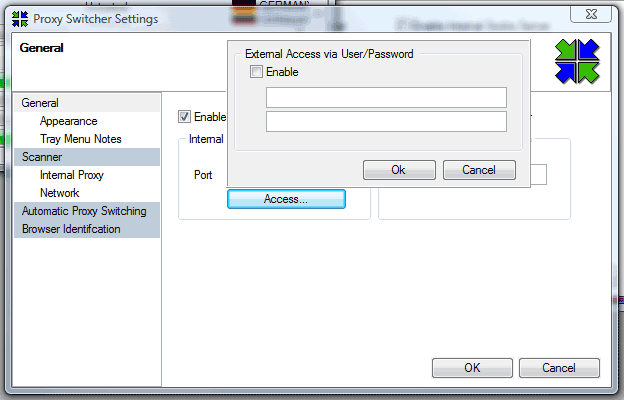
After which you should exit Proxy Switcher (main menu File ⇒ Exit).
Making Proxy Switcher accept connections from everyone
By default Proxy Switcher can work in to modes:- accept requests from localhost without requiring authentication
- accept requests from everyone but ask for username and password
 To do this - find Proxy Switcher shortcut in Start menu and right-click on it, then click on properties.
After which you can start up Proxy Switcher and it will accept requests from everyone without requiring authentication. Which means that anyone can potentially access it.
Configuring PlayStation
I don't have access to PS3, but roughly this is how it should go: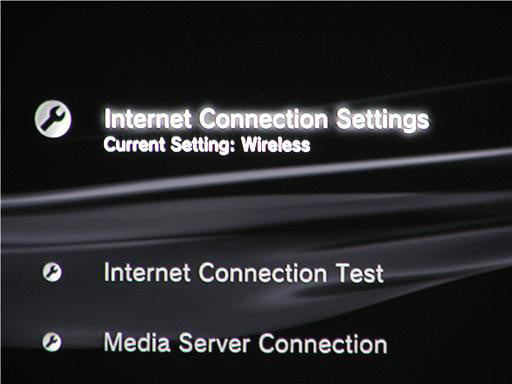
- Select "Settings"
- Select "Network Settings"
- Select "Internet Connection Settings"
- Select "Yes" when a confirmation screen is displayed stating that you will be disconnected from the Internet
- Select "Custom"
- Adjust each item as necessary for the network environment in use. The items displayed vary depending on the settings you have selected
- Proxy Server - Set the IP address and port (default 3128) of the machine that is running the Proxy Switcher
General
Anonymous Browsing - Why & How Does It Work
How to configure Firefox for increased privacy
Standard vs Pro version
Automatic Proxy Switching
Anonymous Browsing Using Socks servers
How to force program to use proxy server
Use Case - Anonymous Torrents
Use Case - Dealing with Group Policy proxy settings
Use Case - beating BBC iPlayer
Use Case - beating Hulu.com
Use Case - beating Forum IP ban
Use Case - beating Rapidshare.com
Use Case - watching YouTube.com's not available videos
Use Case - posting on Craigslist
Proxy Scanner Options Explained
Special GEO Handling
In-Depth Proxy Server Testing
Proxy Test Target Management
Import/Export proxy lists
Internal Proxy Servers
PlayStation 3 + Proxy Switcher
ProxySwitcher's proxy scanner: Maximizing Scanning Speed