ProxySwitcher's proxy scanner:
Maximizing Scanning Speed
Before you start reading this - I need to warn you that instructions here can potentially make your machine unbootable, and are intended for the advanced users only who understand what exactly they are doing in each step.
How Proxy Switcher operates
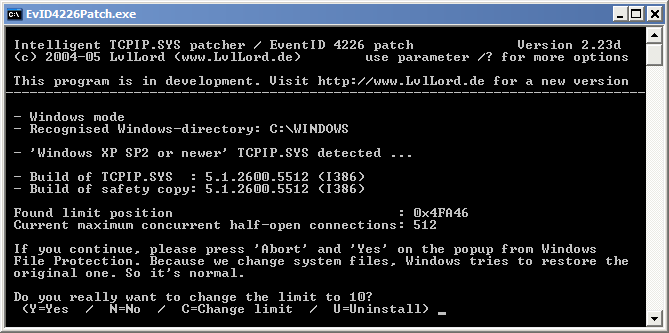
Now on to understanding what Proxy Switcher does to find working/anonymous/elite servers. First thing that gets done is fetching list of web site addresses that contain public proxy lists. Then this list is used to download and parse actual proxy lists from all the listed web servers. Now comes in the actual scanning - Proxy Switcher has to go over all the proxy addresses that were retrieved and actually try to use them to determine are they any good.This is where the scanning speed can become an issue since there are so many servers to check. Actually Proxy Switcher is built with real high speed scanning in mind. The reason why we usually have to scan only about 5-7 servers in parallel is thanks to the Microsoft. It has built in artificial connection throttling mechanism into some Windows operating systems (all Windows from XP SP2 to Vista x64 SP1). This limiter disables program from making connections if it tries to do it too fast.
Changing Scanner Options
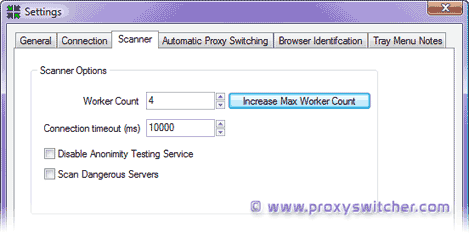 This is the actual dialog where you can set proxy scanner options. Worker count option
is what controls how many servers in parallel are checked during the
scanning. The obvious way to speed up scanning is to increase worker count to an
amount your internet connection can handle without getting timeouts.
This is the actual dialog where you can set proxy scanner options. Worker count option
is what controls how many servers in parallel are checked during the
scanning. The obvious way to speed up scanning is to increase worker count to an
amount your internet connection can handle without getting timeouts.
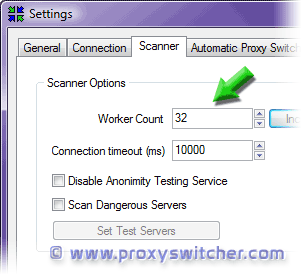 Proxy Switcher is fairly smart - it tries to guess how many connections
Windows will actually allow and sets maximal limit of the worker count
accordingly. If you are certain it has made an error you can press the
Increase Max Worker Count button to override default behaviour.
Keep in mind that if you are wrong setting too high worker count will
break scanning altogether.
Proxy Switcher is fairly smart - it tries to guess how many connections
Windows will actually allow and sets maximal limit of the worker count
accordingly. If you are certain it has made an error you can press the
Increase Max Worker Count button to override default behaviour.
Keep in mind that if you are wrong setting too high worker count will
break scanning altogether.
General
Anonymous Browsing - Why & How Does It Work
How to configure Firefox for increased privacy
Standard vs Pro version
Automatic Proxy Switching
Anonymous Browsing Using Socks servers
How to force program to use proxy server
Use Case - Anonymous Torrents
Use Case - Dealing with Group Policy proxy settings
Use Case - beating BBC iPlayer
Use Case - beating Hulu.com
Use Case - beating Forum IP ban
Use Case - beating Rapidshare.com
Use Case - watching YouTube.com's not available videos
Use Case - posting on Craigslist
Proxy Scanner Options Explained
Special GEO Handling
In-Depth Proxy Server Testing
Proxy Test Target Management
Import/Export proxy lists
Internal Proxy Servers
PlayStation 3 + Proxy Switcher
ProxySwitcher's proxy scanner: Maximizing Scanning Speed