Stop Group Policy from overriding your proxy settings.
Group Policy & Proxy settings.
Proper Windows 8 support for this feature is starting from version 5.5.1. Running earlier versions with Windows 8 can cause trouble.
If your machine is a member of domain, then it could be that every 5 to 90 minutes your proxy settings get changed.
It happens if domain controller pushes out group policy settings. But there is a way avoid such annoying behavior.

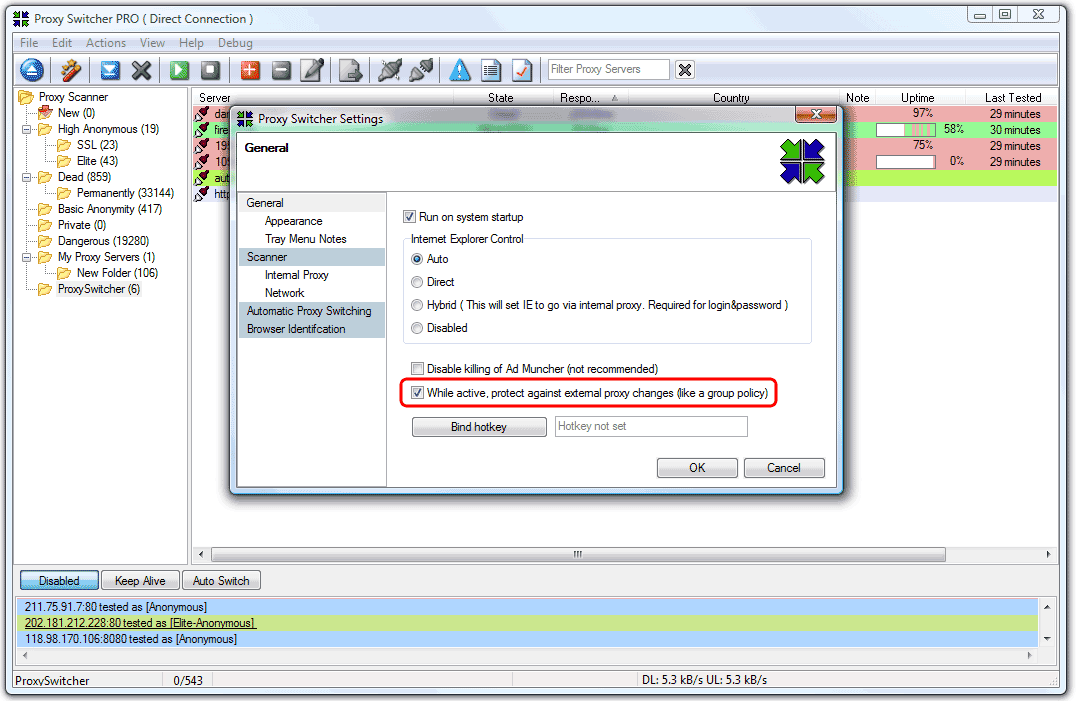
Proxy Switcher can stop proxy changes by group policy settings.
Solution is to go to View->Preferences... from main menu. Then in General tab make sure the checkbox While active, protect against external proxy changes (like a group policy).How does it work
If you are interested - this is how it works: when GPO is refreshed Windows writes updated proxy settings into registry. Thus the proxy settings get changed. What Proxy Switcher does is goes into registry and keep proxy settings as read-only, for most of the time, to prevent group policy settings from being applied to proxy settings.
General
Anonymous Browsing - Why & How Does It Work
How to configure Firefox for increased privacy
Standard vs Pro version
Automatic Proxy Switching
Anonymous Browsing Using Socks servers
How to force program to use proxy server
Use Case - Anonymous Torrents
Use Case - Dealing with Group Policy proxy settings
Use Case - beating BBC iPlayer
Use Case - beating Hulu.com
Use Case - beating Forum IP ban
Use Case - beating Rapidshare.com
Use Case - watching YouTube.com's not available videos
Use Case - posting on Craigslist
Proxy Scanner Options Explained
Special GEO Handling
In-Depth Proxy Server Testing
Proxy Test Target Management
Import/Export proxy lists
Internal Proxy Servers
PlayStation 3 + Proxy Switcher
ProxySwitcher's proxy scanner: Maximizing Scanning Speed